
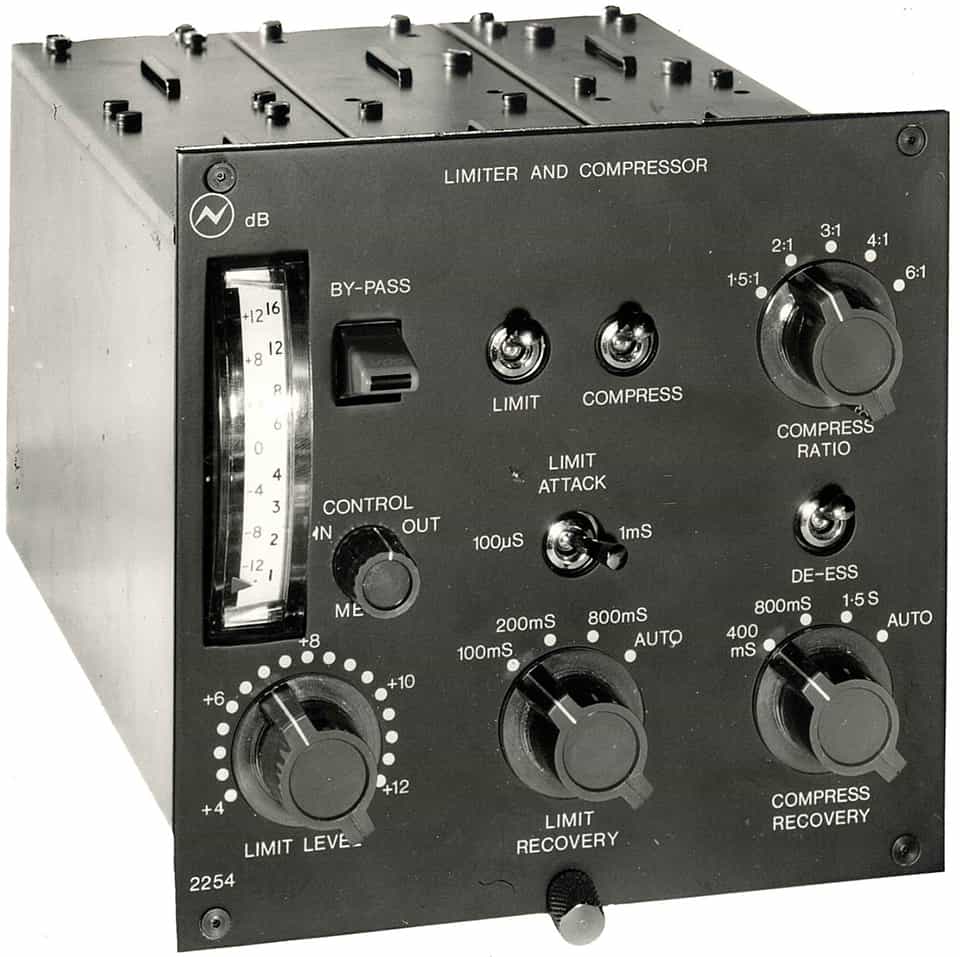
The Neve 2254 compressor became one of the most recognizable dynamics processors in recording history for its distinctive diode-bridge sound and solid Class A circuitry. Its design was the foundation for many later Neve compressors, including the famous 33609.
History of the Neve 2254 Compressor
The Neve 2254 was first introduced in 1969 as a mono compressor/limiter module designed to fit directly into Neve’s large-format consoles. It quickly became a defining part of the Neve sound thanks to its transformer-coupled input and output stages, diode-bridge gain control circuit, and discrete Class A electronics. The 2254 was compact and engineers found easy it to integrate into recording and mixing setups.
Origins and Early Development
Before the 2254, Neve had already developed diode-bridge limiter designs such as the 2253, which were primarily intended for broadcast applications. The 2254 built upon that concept but adapted it for studio use. The key innovation was combining both a compressor and limiter in one module, allowing flexible control over dynamic range while maintaining a smooth, musical response. The design featured a step-down transformer to reduce the level feeding the diode bridge, minimizing distortion, followed by a step-up transformer to restore gain — a method that became a hallmark of Neve dynamics processors.
Design Features and Construction
The 2254’s circuit used a combination of transformers and Class A discrete amplifiers, contributing to the unit’s thick, harmonically rich tone. The diode bridge, while not inherently linear, produced a unique form of compression that many engineers found sonically pleasing. The module’s controls were simple: selectable ratios, fixed and switchable release times, and separate limiter and compressor sections. These characteristics gave the 2254 its signature sound, which remains distinctive even by modern standards.
Revisions and Variants
Several revisions of the 2254 appeared over time, refining its performance and expanding its usability. The original 2254 had limited control options, but later versions introduced improvements like adjustable threshold, faster attack times, and greater flexibility in linking multiple units. Variants such as the 2254/A, 2254/E, and 2254/R maintained the same essential sound but adapted to changing studio needs, from console integration to standalone rack units. Despite the evolution, all models shared the same core design philosophy: transformer-balanced, Class A, diode-bridge compression.
Legacy and Influence
The Neve 2254 became standard equipment in Neve’s 80-Series consoles during the 1970s and remained a studio favorite for its ability to control dynamics without losing tone or punch. Its sonic footprint directly influenced the design of later Neve compressors like the 33609, which essentially combined two 2254-style circuits in stereo configuration. Decades later, reissues and faithful recreations continue to appear, keeping the design relevant in both analog and digital forms.
Timeline
- 1969 – Original Neve 2254 compressor/limiter module released for Neve consoles.
- Early 1970s – The 2254 becomes a standard dynamics module in Neve 80-Series consoles.
- Late 1970s – Introduction of the 2254/A with additional threshold and make-up gain controls.
- 1980s – 2254/E variant offers more flexibility and slightly faster attack options.
- 2000s – AMS Neve releases the 2254/R reissue, featuring a modern rack format and improved reliability.
Software Emulations
- UAD Neve Dynamics Collection (includes 2254/E model)
- Waves V-Comp (inspired by the Neve 2254 design)
- Lindell Audio 254E (faithful diode-bridge emulation with modern controls)
- Arturia Comp Diode-609 (based on 2254-style topology)
Tips and Techniques
-
Start with Moderate Ratios
Set the compressor ratio around 2:1 or 3:1 to maintain a natural sense of dynamics while tightening the signal. This is the range where the Neve 2254 performs most predictably, especially on bus or mix compression. Begin with about 3 dB of gain reduction and fine-tune from there while monitoring how the signal responds.
-
Compressor Before Limiter
Although the faceplate layout suggests the limiter might come first, signal flow on the 2254 places the compressor before the limiter. Use the compressor to control general level and movement, then set the limiter to catch peaks. This sequence keeps the limiter from working too hard and preserves transient detail.
After setting the compressor, engage the limiter with a slightly higher threshold. This dual-stage approach creates controlled gain reduction that transitions smoothly into firm peak control. When both are dialed in correctly, the 2254 can act like a clean clipper, stopping fast transients without distorting.
-
Drive the Input Stage
The 2254’s diode-bridge circuit and transformers respond musically to input level. Increase the input or trim gain to push the signal harder into compression, then reduce output to maintain balance. In plugin versions, use the input or “drive” control to achieve the same effect. This helps you hear the compressor’s true behavior under realistic levels.
-
Use an Input Trim Before the Compressor
Feeding the 2254 a healthy level makes it behave more consistently. If you’re working digitally, insert a trim or gain plugin before the compressor and push the input to around -18 dBFS or higher. Then balance the output level after the 2254 to avoid clipping. This recreates the level calibration of the original analog units.
-
Set Gain Reduction Intentionally
For bus or mix processing, aim for about 2–4 dB of gain reduction to maintain cohesion without over-compression. For more noticeable control, go up to 6–8 dB. The diode-bridge topology responds best when it’s not over-driven by extreme reduction. Use your meters to find the balance between control and tone.
-
Serial Compression for Precision
Try using two 2254s—or two plugin instances—in sequence. Set the first for gentle control (2:1 ratio, slower release) and the second for faster, more assertive compression. This staged approach evens out dynamics without the heavy-handed sound that can occur with a single aggressive setting.
-
Experiment with the Analog or Noise Controls in Plugins
Many plugin versions, such as Waves V-Comp, include an “Analog” control that adds modeled noise and low-level hiss. These artifacts are purely cosmetic and not part of the real compression behavior. For most workflows, it’s best to leave this off for a cleaner signal unless you’re intentionally adding noise for excessive realism!
-
Use on Drum or Mix Bus
The 2254’s diode-bridge response makes it particularly effective on drum or mix buses. Start with moderate compression, using the limiter for peaks. Adjust release to sync with the tempo of the track so the compressor breathes in time with the music. Plugin versions often include stereo-linking controls—keep linking engaged for even gain reduction across both channels.